Example: Classifying Images - Dogs vs. Cats#
The Dogs vs. Cats dataset is a popular dataset for binary image classification tasks. It consists of 25,000 images of dogs and cats, with 12,500 images of each class. The goal is to build a model that can accurately classify whether an image contains a dog or a cat.
Download the Dataset#
The Dogs vs. Cats dataset is not packaged with Keras. It was made available by Kaggle as part of a computer vision competition in late 2013. You can download the original dataset from www.kaggle.com/c/dogs-vs-cats/data (you’ll need to create a Kaggle account if you don’t already have one).
Warning
The following code assumes that you have already downloaded the dataset and unzipped it into a folder named dogs-vs-cats in your current working directory. The dataset contains two folders: train and test. The train folder contains 25,000 images of dogs and cats (that are labelled), while the test folder contains 12,500 images of dogs and cats (that are unlabelled).
import os
import shutil
import pathlib
original_dir = pathlib.Path("dogs-vs-cats/train")
new_base_dir = pathlib.Path("cats_vs_dogs_small")
def make_subset(subset_name, start_index, end_index):
    for category in ("cat", "dog"):
        dir = new_base_dir / subset_name / category
        # Create the directory if it doesn't exist
        if not dir.exists():
            os.makedirs(dir)
        fnames = [f"{category}.{i}.jpg" for i in range(start_index, end_index)]
        for fname in fnames:
            print(original_dir / fname)
            shutil.copyfile(src=original_dir / fname, dst=dir / fname)
make_subset("train", start_index=0, end_index=1000)
make_subset("validation", start_index=1000, end_index=1500)
make_subset("test", start_index=1500, end_index=2500)
dogs-vs-cats/train/cat.0.jpg
---------------------------------------------------------------------------
FileNotFoundError                         Traceback (most recent call last)
Cell In[3], line 1
----> 1 make_subset("train", start_index=0, end_index=1000)
      2 make_subset("validation", start_index=1000, end_index=1500)
      3 make_subset("test", start_index=1500, end_index=2500)

Cell In[2], line 10, in make_subset(subset_name, start_index, end_index)
      8 for fname in fnames:
      9     print(original_dir / fname)
---> 10     shutil.copyfile(src=original_dir / fname, dst=dir / fname)

File /opt/hostedtoolcache/Python/3.11.12/x64/lib/python3.11/shutil.py:256, in copyfile(src, dst, follow_symlinks)
    254     os.symlink(os.readlink(src), dst)
    255 else:
--> 256     with open(src, 'rb') as fsrc:
    257         try:
    258             with open(dst, 'wb') as fdst:
    259                 # macOS

FileNotFoundError: [Errno 2] No such file or directory: 'dogs-vs-cats/train/cat.0.jpg'
Create the Dataset#
We will use the image_dataset_from_directory utility to create a dataset from the downloaded images. This utility will automatically label the images based on their directory structure.
from tensorflow.keras.utils import image_dataset_from_directory

train_dataset = image_dataset_from_directory( new_base_dir / "train", image_size=(180, 180), batch_size=32)

validation_dataset = image_dataset_from_directory( new_base_dir / "validation", image_size=(180, 180), batch_size=32)

test_dataset = image_dataset_from_directory( new_base_dir / "test", image_size=(180, 180), batch_size=32)
Found 2001 files belonging to 2 classes.
Found 1000 files belonging to 2 classes.
2025-04-15 06:54:59.727697: I metal_plugin/src/device/metal_device.cc:1154] Metal device set to: Apple M2 Max
2025-04-15 06:54:59.727731: I metal_plugin/src/device/metal_device.cc:296] systemMemory: 96.00 GB
2025-04-15 06:54:59.727735: I metal_plugin/src/device/metal_device.cc:313] maxCacheSize: 36.00 GB
2025-04-15 06:54:59.727756: I tensorflow/core/common_runtime/pluggable_device/pluggable_device_factory.cc:305] Could not identify NUMA node of platform GPU ID 0, defaulting to 0. Your kernel may not have been built with NUMA support.
2025-04-15 06:54:59.727768: I tensorflow/core/common_runtime/pluggable_device/pluggable_device_factory.cc:271] Created TensorFlow device (/job:localhost/replica:0/task:0/device:GPU:0 with 0 MB memory) -> physical PluggableDevice (device: 0, name: METAL, pci bus id: <undefined>)
Found 2000 files belonging to 2 classes.
print(type(train_dataset))
<class 'tensorflow.python.data.ops.prefetch_op._PrefetchDataset'>
Digression: Tensorflow Datasets#
The tf.data.Dataset class in TensorFlow is a convenient way to build efficient, scalable data pipelines for machine learning. It helps you load, preprocess, and batch data to feed into your models during training, testing, or inference.
You typically start by creating a dataset from arrays, tensors, or generators.
Common ways include:
from_tensor_slices: Creates a dataset from slices of tensors or arrays.from_generator: Creates a dataset from a generator function.image_dataset_from_directory: Create a dataset for image classification tasks directly from images stored in folders.
Datasets provide key methods to preprocess your data easily:
batch: Combines dataset elements into batches for training.
shuffle: Randomly shuffles the elements to reduce training bias.
map: Applies a preprocessing function to each element.
prefetch: Loads data ahead of time for improved training performance.
Using a tf.data.Dataset provides several important benefits:
Efficiency: Optimized data loading and preprocessing reduces training time.
Scalability: Handles very large datasets seamlessly.
Flexibility: Makes preprocessing transparent and easy to maintain.
You can directly pass a dataset object to Keras model methods such as model.fit() or model.evaluate(), simplifying your training workflow.
import tensorflow as tf

# Example data
X = [[1, 2], [3, 4], [5, 6], [7, 8]]
y = [0, 1, 0, 1]

# Create dataset
dataset = tf.data.Dataset.from_tensor_slices((X, y)).batch(3)

# Iterate over dataset
for batch_x, batch_y in dataset:
    print("Batch X:", batch_x.numpy())
    print("Batch y:", batch_y.numpy())
Batch X: [[1 2]
 [3 4]
 [5 6]]
Batch y: [0 1 0]
Batch X: [[7 8]]
Batch y: [1]
2025-04-15 06:54:59.993576: W tensorflow/core/framework/local_rendezvous.cc:404] Local rendezvous is aborting with status: OUT_OF_RANGE: End of sequence
import tensorflow as tf

(X_train, y_train), _ = tf.keras.datasets.mnist.load_data()

# Prepare dataset
dataset = tf.data.Dataset.from_tensor_slices((X_train, y_train))
dataset = dataset.shuffle(10000) \
                 .batch(64) \
                 .map(lambda x, y: (tf.cast(x, tf.float32) / 255.0, y)) \
                 .prefetch(tf.data.AUTOTUNE)

# Fit model
model = tf.keras.Sequential([
    tf.keras.layers.Input(shape=(28, 28)),
    tf.keras.layers.Flatten(),
    tf.keras.layers.Dense(128, activation='relu'),
    tf.keras.layers.Dense(10, activation='softmax')
])

model.compile(optimizer='rmsprop',
              loss='sparse_categorical_crossentropy',
              metrics=['accuracy'])

history = model.fit(dataset, epochs=5, batch_size=32, verbose=0)

history.history['accuracy'][-1]  # Final accuracy
2025-04-15 06:55:00.512916: I tensorflow/core/grappler/optimizers/custom_graph_optimizer_registry.cc:117] Plugin optimizer for device_type GPU is enabled.
0.9187166690826416
import matplotlib.pyplot as plt
import numpy as np
# Fetch the first batch from the dataset
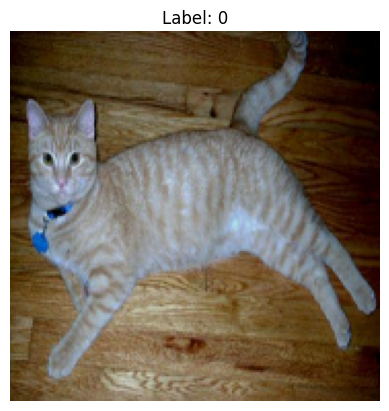
for images, labels in train_dataset.take(1):
    first_image = images[0].numpy().astype("uint8")
    first_label = labels[0].numpy()

print(first_image)
# Display the first image
plt.imshow(first_image)
plt.title(f"Label: {first_label}")
plt.axis('off')
plt.show()
[[[ 9  0  4]
  [11  1  4]
  [15  3  4]
  ...
  [ 0  0  0]
  [ 0  0  0]
  [ 0  0  0]]

 [[10  0  0]
  [13  2  2]
  [ 9  0  0]
  ...
  [ 0  0  0]
  [ 0  0  0]
  [ 0  0  0]]

 [[10  0  0]
  [17  6  3]
  [18  5  0]
  ...
  [ 0  0  0]
  [ 0  0  0]
  [ 0  0  0]]

 ...

 [[79 55 17]
  [74 50 12]
  [76 52 14]
  ...
  [31  9  0]
  [30 11  0]
  [28  9  0]]

 [[71 47  9]
  [74 50 12]
  [86 62 24]
  ...
  [34 12  0]
  [34 15  2]
  [32 12  1]]

 [[71 47  9]
  [69 45  7]
  [80 56 18]
  ...
  [40 18  4]
  [37 18  5]
  [31 11  0]]]
2025-04-15 06:55:24.943785: W tensorflow/core/framework/local_rendezvous.cc:404] Local rendezvous is aborting with status: OUT_OF_RANGE: End of sequence
Create the Model#
We will use a simple convolutional neural network (CNN) architecture for this task. The model will consist of several convolutional layers followed by max-pooling layers, and finally a fully connected layer with a softmax activation function for binary classification.
from tensorflow import keras
from tensorflow.keras import layers
inputs = keras.Input(shape=(180, 180, 3))
x = layers.Rescaling(1./255)(inputs)
x = layers.Conv2D(filters=32, kernel_size=3, activation="relu")(x)
x = layers.MaxPooling2D(pool_size=2)(x)
x = layers.Conv2D(filters=64, kernel_size=3, activation="relu")(x)
x = layers.MaxPooling2D(pool_size=2)(x)
x = layers.Conv2D(filters=128, kernel_size=3, activation="relu")(x)
x = layers.MaxPooling2D(pool_size=2)(x)
x = layers.Conv2D(filters=256, kernel_size=3, activation="relu")(x)
x = layers.MaxPooling2D(pool_size=2)(x)
x = layers.Conv2D(filters=256, kernel_size=3, activation="relu")(x)
x = layers.Flatten()(x)
outputs = layers.Dense(1, activation="sigmoid")(x)

model = keras.Model(inputs=inputs, outputs=outputs)
model.compile(loss="binary_crossentropy",
              optimizer="rmsprop",
              metrics=["accuracy"])
callbacks = [ keras.callbacks.ModelCheckpoint(
    filepath="convnet_from_scratch.keras",
    save_best_only=True,
    monitor="val_loss")

]

history = model.fit(
    train_dataset,
    epochs=30,
    validation_data=validation_dataset,
    callbacks=callbacks,
    verbose=0)
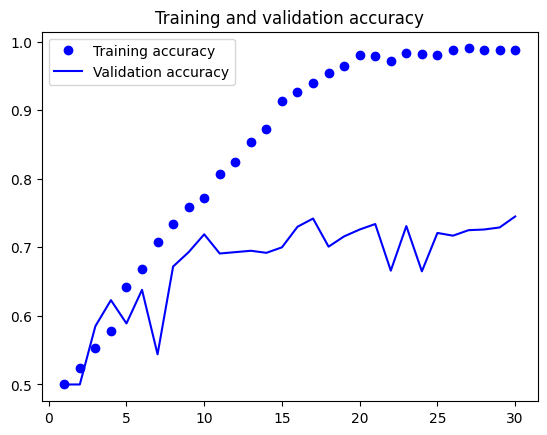
import matplotlib.pyplot as plt

accuracy = history.history["accuracy"]
val_accuracy = history.history["val_accuracy"]
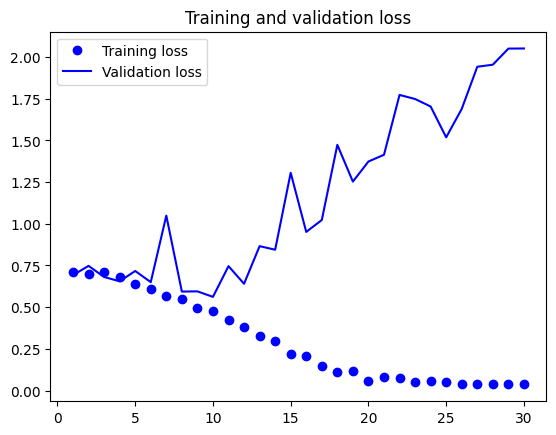
loss = history.history["loss"]
val_loss = history.history["val_loss"]
epochs = range(1, len(accuracy) + 1)


plt.plot(epochs, accuracy, "bo", label="Training accuracy")
plt.plot(epochs, val_accuracy, "b", label="Validation accuracy")
plt.title("Training and validation accuracy")
plt.legend()
plt.figure()

plt.plot(epochs, loss, "bo", label="Training loss")

plt.plot(epochs, val_loss, "b", label="Validation loss")
plt.title("Training and validation loss")
plt.legend()
plt.show()
import os

test_model = keras.models.load_model("convnet_from_scratch.keras")

test_loss, test_acc = test_model.evaluate(test_dataset)
print(f"Test accuracy: {test_acc:.3f}")
63/63 ━━━━━━━━━━━━━━━━━━━━ 1s 16ms/step - accuracy: 0.7170 - loss: 0.5688
Test accuracy: 0.720
Dealing with Overfitting - Data Augmentation#
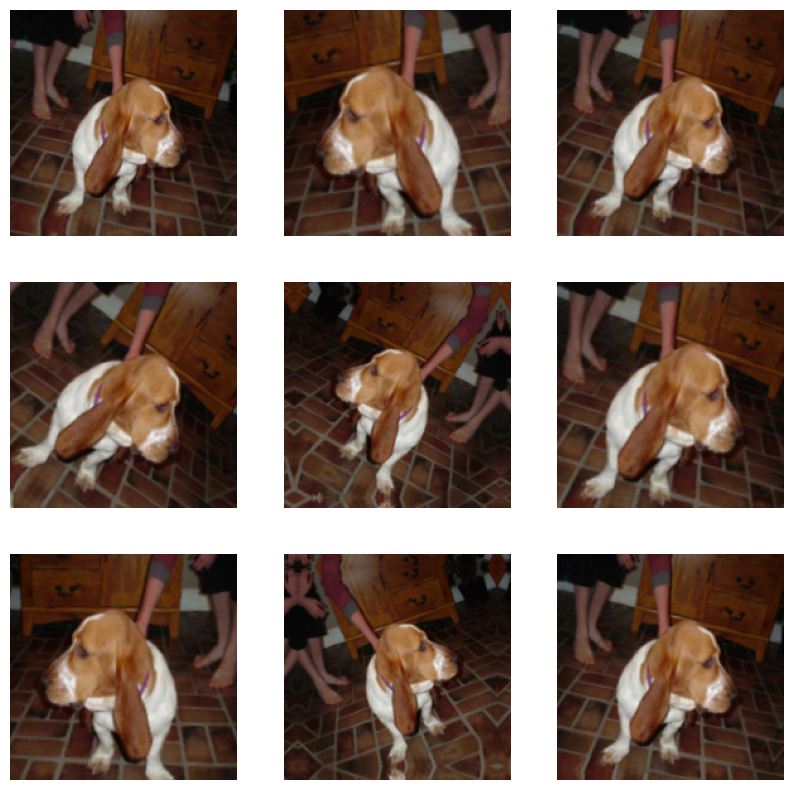
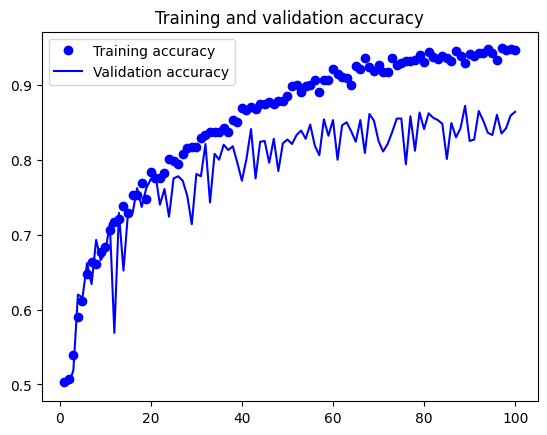
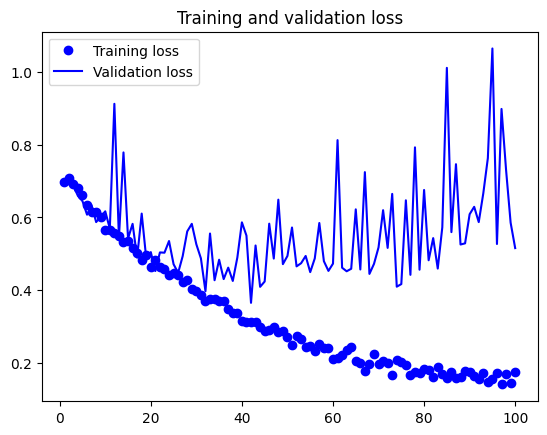
One approach to reduce overfitting is to use data augmentation. Data augmentation is a technique that artificially increases the size of the training dataset by applying random transformations to the images, such as rotation, zoom, and flipping. This helps the model generalize better to unseen data.
data_augmentation = keras.Sequential( [
    layers.RandomFlip("horizontal"),
    layers.RandomRotation(0.1),
    layers.RandomZoom(0.2), ]
    )
plt.figure(figsize=(10, 10))

for images, _ in train_dataset.take(1):
    for i in range(9):
        augmented_images = data_augmentation(images)
        ax = plt.subplot(3, 3, i + 1)
        plt.imshow(augmented_images[0].numpy().astype("uint8"))
        plt.axis("off")
2025-04-15 06:56:32.907392: W tensorflow/core/framework/local_rendezvous.cc:404] Local rendezvous is aborting with status: OUT_OF_RANGE: End of sequence
inputs = keras.Input(shape=(180, 180, 3))

x = data_augmentation(inputs)
x = layers.Rescaling(1./255)(x)

x = layers.Conv2D(filters=32, kernel_size=3, activation="relu")(x)
x = layers.MaxPooling2D(pool_size=2)(x)
x = layers.Conv2D(filters=64, kernel_size=3, activation="relu")(x)
x = layers.MaxPooling2D(pool_size=2)(x)
x = layers.Conv2D(filters=128, kernel_size=3, activation="relu")(x)
x = layers.MaxPooling2D(pool_size=2)(x)
x = layers.Conv2D(filters=256, kernel_size=3, activation="relu")(x)
x = layers.MaxPooling2D(pool_size=2)(x)
x = layers.Conv2D(filters=256, kernel_size=3, activation="relu")(x)
x = layers.Flatten()(x)
x = layers.Dropout(0.5)(x)
outputs = layers.Dense(1, activation="sigmoid")(x)

model = keras.Model(inputs=inputs, outputs=outputs)

model.compile(loss="binary_crossentropy",
              optimizer="rmsprop",
              metrics=["accuracy"])
callbacks = [ keras.callbacks.ModelCheckpoint(
    filepath="convnet_from_scratch_with_augmentation.keras",
    save_best_only=True,
    monitor="val_loss")]

history = model.fit(
    train_dataset,
    epochs=100,
    validation_data=validation_dataset,
    callbacks=callbacks,
    verbose=0)
import matplotlib.pyplot as plt

accuracy = history.history["accuracy"]
val_accuracy = history.history["val_accuracy"]
loss = history.history["loss"]
val_loss = history.history["val_loss"]

epochs = range(1, len(accuracy) + 1)

plt.plot(epochs, accuracy, "bo", label="Training accuracy")
plt.plot(epochs, val_accuracy, "b", label="Validation accuracy")
plt.title("Training and validation accuracy")
plt.legend()
plt.figure()

plt.plot(epochs, loss, "bo", label="Training loss")

plt.plot(epochs, val_loss, "b", label="Validation loss")
plt.title("Training and validation loss")
plt.legend()
plt.show()
test_model = keras.models.load_model( "convnet_from_scratch_with_augmentation.keras")
test_loss, test_acc = test_model.evaluate(test_dataset)
print(f"Test accuracy: {test_acc:.3f}")
63/63 ━━━━━━━━━━━━━━━━━━━━ 1s 13ms/step - accuracy: 0.8230 - loss: 0.4156
Test accuracy: 0.826